With a new edition of OK to Make Money Online, we are going to look at Search Engine Optimization (SEO). SEO is just a fancy term for teaching Google about your website so it can send the best traffic your way and place the proper ads on your page.
Most web sites do not focus on keywords or keyword optimization. The website authors do not do the proper keyword research and so the pages and the site are not keyword optimized. Then when Google spiders the site what does it find? A whole bunch of keywords but very little uniformity, and if by accident there is some keyword uniformity, what is the keyword? Worse yet the keyword or long tail keywords don't even pertain to the main subject of the site.
So what is a webster to do? Take a hard look at your website or blog: what is the main subject? Do you have multiple subjects? Are the subjects related? Is your visual subject different from your textual subject?
If we look over at a cooking site, can you find the main topic? Would it be desserts, beef, American, French, or general? Now therein lies the problem: the information is too general. If we are doing a niche site, we need to be more specific. So we need to break a general site into ten or twenty sites, with each site concerned with one food group, say beef or salads. Now we are talking about a niche. Got the idea?
Now for each major topic, you will need to create a blog or website. However, first you need to research the keyword you will use for each of your major topics. This is where Google's Keyword Tool (under Adwords) comes in to play. When you use this tool properly, it will help you to focus on a proper keyword or long tail keyword.
When you have gathered your keywords, run over to Blogger or check the URLs for your keyword being available. If it's not, add a few words to the back or front to create a unique keyword, but don't use hyphens to separate your keywords. After installing your site, create your privacy page, about page and your introductory page making sure to use your keyword to make money online.
If you are working from a site that is too general, break the articles up, rewrite them using your new-found keywords, and copy them over to your new sites, according to category/keyword. Make sure to use your keyword in the title, first paragraph, once or twice in the body, and in the last paragraph.
Some articles will contain pictures. Make sure you have your keyword or keyword phrase in the description area of the picture, usually found in the HTML code. This is often the text that is displayed while you are waiting for the picture to be displayed.
However don't overdo it! Overuse was used by Black Hats to trick Google. Google now detects if you overuse a keyword, and will flag you for keyword stuffing.
Review of the rules: make sure your site sticks to one topic, make sure you research your keyword or long tail keyword, and use your keywords in every article and page on your site to make money online. Then as always, get as many backlinks to your site as you can (i.e. traffic).
Michael
Showing posts with label Work At Home. Show all posts
Showing posts with label Work At Home. Show all posts
Wednesday, July 1, 2009


Friday, May 29, 2009
Getting Your Blog or Website Indexed With OK To Make Money Online
In this edition of OK to Make Money Online, let's concentrate on getting your site indexed by Google. Now, I cannot guarantee you will be indexed, that is solely up to Google, but if you follow the rules, you most likely will be indexed.
So, look at the best practices outlined so far:
1) You have a proper blog setup and active using either Blogger account or a domain name hosting Wordpress or Joomla.
2) The title of your blog contains your keyword(s) mine is Make Money.
3) You have an “About” page that includes your long tail keyword and a back link to your site.
4) You have copy and revised Google's Privacy Page example or copied my Privacy Page and revised it.
5) Check that your site is verified and contains a Sitemap link in Google.
6) Two or more original articles are posted on your site using your keywords.
7) You have multiple tags per article, at least 10 relevant tags.
8) When using WordPress, you have multiple categories.
9) You have installed your Technorati link and claimed your site.
Getting indexed in the Google search engine is our next task. If you are not indexed, it will be very difficult for someone to find you using the Google search engine. So how are you indexed? After you have polished up your Blog and have registered with Adsense it's time to get you indexed.
Remember that Adsense account we just created in Make Money – Adsense? Log in to that account and click on the "Resources" tab. On this page, under References, find the "Webmaster guidelines" and click it. On the next page, about half way down the middle column will be "When your site is ready" and under the title you will see a hyperlink to addurl.html. Click on this link.
This new page will have a sub-title called "Share your place on the net with us." In the URL input text field type your blogs URL address. Then add a comment and your keyword. Enter the squiggly name to verify a human entered the text and press the Add URL button.
After entering the squiggly letters correctly, you should see something like "Thank you, Your site URL has been successfully added to our list of URLs to crawl. Please note that we do not add all submitted URLs to our index, and we cannot make any predictions or guarantees about when or if they will appear", that how you make money.
The next edition of OK to Make Money online will be SEO for your blog.
BigBear
So, look at the best practices outlined so far:
1) You have a proper blog setup and active using either Blogger account or a domain name hosting Wordpress or Joomla.
2) The title of your blog contains your keyword(s) mine is Make Money.
3) You have an “About” page that includes your long tail keyword and a back link to your site.
4) You have copy and revised Google's Privacy Page example or copied my Privacy Page and revised it.
5) Check that your site is verified and contains a Sitemap link in Google.
6) Two or more original articles are posted on your site using your keywords.
7) You have multiple tags per article, at least 10 relevant tags.
8) When using WordPress, you have multiple categories.
9) You have installed your Technorati link and claimed your site.
Getting indexed in the Google search engine is our next task. If you are not indexed, it will be very difficult for someone to find you using the Google search engine. So how are you indexed? After you have polished up your Blog and have registered with Adsense it's time to get you indexed.
Remember that Adsense account we just created in Make Money – Adsense? Log in to that account and click on the "Resources" tab. On this page, under References, find the "Webmaster guidelines" and click it. On the next page, about half way down the middle column will be "When your site is ready" and under the title you will see a hyperlink to addurl.html. Click on this link.
This new page will have a sub-title called "Share your place on the net with us." In the URL input text field type your blogs URL address. Then add a comment and your keyword. Enter the squiggly name to verify a human entered the text and press the Add URL button.
After entering the squiggly letters correctly, you should see something like "Thank you, Your site URL has been successfully added to our list of URLs to crawl. Please note that we do not add all submitted URLs to our index, and we cannot make any predictions or guarantees about when or if they will appear", that how you make money.
The next edition of OK to Make Money online will be SEO for your blog.
BigBear
Friday, April 10, 2009
Ok To Make Money Online – Creating a Sitemap
Increase your ability to get indexed faster in this article of OK to Make Money Online.
1st Step: Assuming you are using Blogger let’s get started.
Now log yourself into Google’s Sitemap page. Just under the title Dashboard you will find Add Site. Type in your site URL name in the space provided.
Note of Caution: During the process I my OK to Make Money Online site with "www". Later when getting the Sitemap from Blogger, Google gave me errors back. It seems that the Sitemap generated by Blogger did not need a ‘www’ prefix. I had to go back and submit another site without the “www” prefix.
To check your site information in the atom.xml (Sitemap file) type in http://your.blog.blogspot.com/atom.xml into I.E. using your URL name of course.
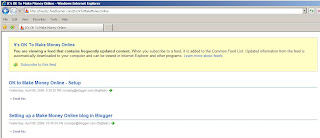
If you hover over the first title "OK Make Money Online" displayed in blue you will see at the bottom, when using “IE”, the URL for the title. If there is no “www” then enter your URL with no prefix.
Go back to Google's Sitemap page and click the OK button. Google will tell you the site has been added. In my case "OK to Make Money Online" was added.
2nd Step: Verify your ownership of blog. Google want you to verify that you own this blog. Press the word ‘Verified?’. This will take you to the “Verify a Site” page. You should see your URL site name just below the title line "OK Make Money Online" and a Box that says looks like:
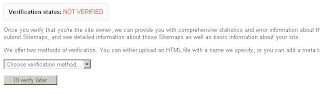
Choose the verification method; Using Blogger the only choice you have is using a Meta tag below:

Go to Blogger and sign in to your account. Click on the “Layout” tab in the upper left corner. Then click on the “Edit HTML” tab. Scroll down from the Top and find the "head" tag. Copy and Paste the text from Google’s Meta tag window just after the "head" tag.

Press the SAVE TEMPLATE button. You may sign out if you want but you don’t need to.
Returning to Google’s “Verify a Site” page. Click the “Verify” button. You should now see the Overview Page with your URL listed at the top.
3rd Step: Adding the Sitemap.
Now that Step 2 is complete we need to provide Google with a Sitemap in my case for "OK to Make Money Online". This will help Google when you republish a page, add more articles, archive pages, etc.
Click the Sitemaps button on the left side of the Overview page. You will now be in the Sitemaps page and your URL should be listed under the title.
On your right should be a place to input text and button Submit Sitemap, enter the text “/feeds/posts/default?orderby=updated” in the field and press the Submit Sitemap button. Google will give you a confirmation message and display the following:

It will take a couple of hours to crawl your site and there is not guarantee that Google will list it. But be patient it does take time. My blog "OK to Make Money Online" was verified in a few hours.
BigBear
Tags: make money, blogging, blog, tags, marketing, sitemake, blog marketing, blog promotion, successful blog
1st Step: Assuming you are using Blogger let’s get started.
Now log yourself into Google’s Sitemap page. Just under the title Dashboard you will find Add Site. Type in your site URL name in the space provided.
Note of Caution: During the process I my OK to Make Money Online site with "www". Later when getting the Sitemap from Blogger, Google gave me errors back. It seems that the Sitemap generated by Blogger did not need a ‘www’ prefix. I had to go back and submit another site without the “www” prefix.
To check your site information in the atom.xml (Sitemap file) type in http://your.blog.blogspot.com/atom.xml into I.E. using your URL name of course.

If you hover over the first title "OK Make Money Online" displayed in blue you will see at the bottom, when using “IE”, the URL for the title. If there is no “www” then enter your URL with no prefix.
Go back to Google's Sitemap page and click the OK button. Google will tell you the site has been added. In my case "OK to Make Money Online" was added.
2nd Step: Verify your ownership of blog. Google want you to verify that you own this blog. Press the word ‘Verified?’. This will take you to the “Verify a Site” page. You should see your URL site name just below the title line "OK Make Money Online" and a Box that says looks like:

Choose the verification method; Using Blogger the only choice you have is using a Meta tag below:

Go to Blogger and sign in to your account. Click on the “Layout” tab in the upper left corner. Then click on the “Edit HTML” tab. Scroll down from the Top and find the "head" tag. Copy and Paste the text from Google’s Meta tag window just after the "head" tag.

Press the SAVE TEMPLATE button. You may sign out if you want but you don’t need to.
Returning to Google’s “Verify a Site” page. Click the “Verify” button. You should now see the Overview Page with your URL listed at the top.
3rd Step: Adding the Sitemap.
Now that Step 2 is complete we need to provide Google with a Sitemap in my case for "OK to Make Money Online". This will help Google when you republish a page, add more articles, archive pages, etc.
Click the Sitemaps button on the left side of the Overview page. You will now be in the Sitemaps page and your URL should be listed under the title.
On your right should be a place to input text and button Submit Sitemap, enter the text “/feeds/posts/default?orderby=updated” in the field and press the Submit Sitemap button. Google will give you a confirmation message and display the following:

It will take a couple of hours to crawl your site and there is not guarantee that Google will list it. But be patient it does take time. My blog "OK to Make Money Online" was verified in a few hours.
BigBear
Tags: make money, blogging, blog, tags, marketing, sitemake, blog marketing, blog promotion, successful blog
Thursday, April 9, 2009
Ok To Make Money Online – Sitemap Checklist
On It' Ok to Make Money Online Sitemap Checklist we will cover a few problems that I have encountered.
During Step 3 in my post of OK to Make Money Creating a Sitemap I originally input "Atom.xml" when I did the Submit Sitemap.
I had received the information for other sites, the information in not correct. The second part of my confusion was the error messages provided by Google, they provide no information on how to fix the problem. Google just informed me I had errors. So where do you go when you have errors and no answers, Webmaster Help Forum.
BigBear
During Step 3 in my post of OK to Make Money Creating a Sitemap I originally input "Atom.xml" when I did the Submit Sitemap.
I had received the information for other sites, the information in not correct. The second part of my confusion was the error messages provided by Google, they provide no information on how to fix the problem. Google just informed me I had errors. So where do you go when you have errors and no answers, Webmaster Help Forum.
BigBear
Tuesday, April 7, 2009
OK to Make Money Online – How to Get Indexed
In this article of OK to Make Money online we will cover getting you indexed.
After setting up your account you need to get some traffic. No one at this point knows where your Blog is, so we need some way to tell them. This is where Google come in to play. Google’s bots search the internet daily for new information and updates to information they already have. One of the main tasks of the bots is to index the pages and archives available on the internet. We need to get your new blog indexed. After you have polished up your Blog and have signed up with Adsense let’s improve your chances of getting indexed.
If you have not setup your Adsense account yet then have a look at “OK to Make Money Online – Adsense”, else log in to your account.
Select “Resources” tab, then “Webmaster guidelines” tab. You should notice below the title “When your site is ready” you will see http://www.google.com/addurl.html, select the text and hit return.
You should be at Google’s “Add your URL to Google” page. Using your URL enter it in the space provided, using this URL I entered http://oktomakemoneyonline.blogspot.com. It is wise to enter a comment with your keyword even though Google says it doesn’t matter, maybe not today but who knows in the future. Enter the verification text that us shown in squiggly letters, select the Add URL button and hit return.
After correctly entering the squiggly letters Google will send a confirmation message. That’s it!
To increase your odds of being indexed I will cover how to create a Sitemap for your Blogger account in OK to Make Money Online – Creating a Sitemap
BigBear
Tags: make money, blogging, blog, tags, marketing, get indexed, blog marketing, blog promotion, successful blog
Saturday, April 4, 2009
OK to Make Money Online - Setup
Let’s install and setup a Blog in It’s OK to Make Money Online.
Google's Blogger is simple to use, and requires no experience, just sign-up at Blogger with a valid email account. Wordpress is also free but has more bells and whistles than Blogger. It also requires a little more knowledge; you can download it at Wordpress.
Note: Blogs created with WordPress requires WARP and/or a domain, host site, or a website.
Let’s hold off installing your blog till a little later, we need to cover a few initial details about markets and keywords.
A market is what you write about, like farming. What you choose to focus on is your niche, like profitable crops.
With this in mind let's use Google to find you a set of keywords. Enter your keyword or phase in Google, mine is “Make Money Online”, yours could be “profitable farming crops”. Google found 210,000,000 hits using “Make Money Online”.
A well-defined market to be sure and a lot of labor to get to the top of Google’s search engine results page (SERP). Not saying this can’t be done but why fight an up hill battle, better to find that less traveled ground.
Changing the search and add a word or two for “OK to Make Money Online”. This search returned 33,200,000 hits, but still too many. It’s best to start with a niche that has less than one million hits. Check to see if it has a high concentration of paid ads on top three lines and multiple ads on the right side. This may be a great market.
Doing it this way should move you toward the top of a SERP for your niche market. Remember don’t target a niche too small or there won’t be enough traffic to support the number of click throughs to make it profitable
With keywords in hand, you need to pick a blog name or a domain name using the keywords. So if I am using “Ok to Make Money Online” then a URL of www.oktomakemoneyonline.blogspot.com would work and in fact does. This is my URL for Blogger.
Ok so let’s try your new URL name with your keyword. Go to Google and type in; www.oktomakemoneyonline.blogspot.com. If it returns: Your search - www.oktomakemoneyonline.blogspot.com - did not match any documents, you are good to go. If it does return a match then reverse the wording, add a few dashes.
Just make sure your keywords as in the URL you select.
It’s key to remember, you must have a keyword in your Blog, URL or Domain name. Targeting you keywords will help raise you in the SERPs. Don’t forget a keyword in the blog title and the first and last line of your article. It’s a good practice to scattered some though the article. In this example we are using Make Money Online where I am using Bold to highlight it to the search bot.
Warning: don’t over-use your keywords! Google does not like to see more than 6-7 keywords per one hundred words. Google will consider this spamming if you use keywords too often.
Blogger set-up directions can be found at: Blogger Setup.
WordPress set-up directions are a little more complicated: WordPress Setup.
Your first article could be your “About” article. You will not need too many keywords but it’s good to put 1-2% in the article. The next article should be your Private Statement, don’t forget your keyword usage.
Write your article using keywords in the first line of the first paragraph. Don’t over due it but use another 2%-3% of keywords in the main body, but don’t exceed this or you make stay in the sandbox.
The main body must have a reference to an external source to corroborate your subject. One or two is fine. These are considered forward links. In a later article of OK to Make Money Online I will explain what back links are and why you need them.
Make sure your readers leave with something, I.E. a thought ,a new rule or a new way to look at your niche. Also leave a teaser or two for your next article. Don’t give your readers short articles, they may not return.
Google thinks along similar lines. Articles that are short give little information. They will need to be dynamic and should not be static, or the article page rating will decline, and later fall off page one.
When your article has good content, and is informative, even though it is static you are likely to stay on page one. The general belief is that when Goggle categorizes the article a targeted article gives it a superior page ranking.
The next Article in OK to Make Money Online will look at Getting you Indexed.
BigBear
Google's Blogger is simple to use, and requires no experience, just sign-up at Blogger with a valid email account. Wordpress is also free but has more bells and whistles than Blogger. It also requires a little more knowledge; you can download it at Wordpress.
Note: Blogs created with WordPress requires WARP and/or a domain, host site, or a website.
Let’s hold off installing your blog till a little later, we need to cover a few initial details about markets and keywords.
A market is what you write about, like farming. What you choose to focus on is your niche, like profitable crops.
With this in mind let's use Google to find you a set of keywords. Enter your keyword or phase in Google, mine is “Make Money Online”, yours could be “profitable farming crops”. Google found 210,000,000 hits using “Make Money Online”.
A well-defined market to be sure and a lot of labor to get to the top of Google’s search engine results page (SERP). Not saying this can’t be done but why fight an up hill battle, better to find that less traveled ground.
Changing the search and add a word or two for “OK to Make Money Online”. This search returned 33,200,000 hits, but still too many. It’s best to start with a niche that has less than one million hits. Check to see if it has a high concentration of paid ads on top three lines and multiple ads on the right side. This may be a great market.
Doing it this way should move you toward the top of a SERP for your niche market. Remember don’t target a niche too small or there won’t be enough traffic to support the number of click throughs to make it profitable
With keywords in hand, you need to pick a blog name or a domain name using the keywords. So if I am using “Ok to Make Money Online” then a URL of www.oktomakemoneyonline.blogspot.com would work and in fact does. This is my URL for Blogger.
Ok so let’s try your new URL name with your keyword. Go to Google and type in; www.oktomakemoneyonline.blogspot.com. If it returns: Your search - www.oktomakemoneyonline.blogspot.com - did not match any documents, you are good to go. If it does return a match then reverse the wording, add a few dashes.
Just make sure your keywords as in the URL you select.
It’s key to remember, you must have a keyword in your Blog, URL or Domain name. Targeting you keywords will help raise you in the SERPs. Don’t forget a keyword in the blog title and the first and last line of your article. It’s a good practice to scattered some though the article. In this example we are using Make Money Online where I am using Bold to highlight it to the search bot.
Warning: don’t over-use your keywords! Google does not like to see more than 6-7 keywords per one hundred words. Google will consider this spamming if you use keywords too often.
Blogger set-up directions can be found at: Blogger Setup.
WordPress set-up directions are a little more complicated: WordPress Setup.
Your first article could be your “About” article. You will not need too many keywords but it’s good to put 1-2% in the article. The next article should be your Private Statement, don’t forget your keyword usage.
Write your article using keywords in the first line of the first paragraph. Don’t over due it but use another 2%-3% of keywords in the main body, but don’t exceed this or you make stay in the sandbox.
The main body must have a reference to an external source to corroborate your subject. One or two is fine. These are considered forward links. In a later article of OK to Make Money Online I will explain what back links are and why you need them.
Make sure your readers leave with something, I.E. a thought ,a new rule or a new way to look at your niche. Also leave a teaser or two for your next article. Don’t give your readers short articles, they may not return.
Google thinks along similar lines. Articles that are short give little information. They will need to be dynamic and should not be static, or the article page rating will decline, and later fall off page one.
When your article has good content, and is informative, even though it is static you are likely to stay on page one. The general belief is that when Goggle categorizes the article a targeted article gives it a superior page ranking.
The next Article in OK to Make Money Online will look at Getting you Indexed.
BigBear
Subscribe to:
Posts (Atom)
Subscribe To


 Posts
All Comments
Posts
All Comments


